


How AI-Powered Invoice Capture and Automation Workflows Are Eliminating Manual AP Work
Meta Description: Discover how zero-touch vendor invoice processing combines AI-based invoice capture with intelligent automation workflows to match, validate, and post purchase invoices without human intervention. A complete technical guide for AP and finance teams.
Table of Contents
- Introduction: The Manual Invoice Processing Problem
- What Is Zero-Touch Vendor Invoice Processing?
- The Technical Architecture Behind Zero-Touch AP
- AI-Based Invoice Capture: How Machines Read and Interpret Invoices
- Intelligent Data Extraction: Beyond Basic OCR
- Invoice Validation and Business Rule Engines
- Three-Way and Two-Way Matching Automation
- Exception Handling Without Human Bottlenecks
- ERP Integration and Automated Posting
- Vendor Master Data Management and Its Role in Zero-Touch
- Measuring Zero-Touch Rates: KPIs and Benchmarks
- Implementation Roadmap: From Manual to Zero-Touch
- Security, Compliance, and Audit Considerations
- Common Pitfalls and How to Avoid Them
- The Future of Zero-Touch Invoice Processing
- Conclusion
1. Introduction: The Manual Invoice Processing Problem
Ask any accounts payable professional what their single biggest operational challenge is, and the answer is almost always the same: volume, variability, and velocity of vendor invoices.
The average enterprise processes thousands of purchase invoices every month. Each one arrives in a different format—PDFs from email, scanned paper documents, EDI transmissions, supplier portal uploads, or even fax images that somehow still exist in 2024. Each invoice carries its own layout, terminology, field structure, and line-item logic. And every single one needs to be captured, validated, matched against a purchase order or receiving record, approved if necessary, and ultimately posted to the general ledger before a payment run.
When this process is manual, the numbers are brutal:
- Average cost per invoice: $10–$15 for highly manual processes, compared to under $2 for automated ones
- Processing time: 7–14 days for manual workflows versus less than 24 hours for automated systems
- Error rates: 3–5% for manual keying, which compounds across thousands of transactions
- Staff utilization: AP teams spend up to 70% of their time on low-value data entry and chasing approvals
The business cost isn’t just financial. Late payments damage supplier relationships. Duplicate payments drain cash. Unmatched invoices create reconciliation nightmares at period close. And in regulated industries, compliance gaps in invoice processing carry legal consequences.
Zero-touch vendor invoice processing is the answer the industry has been moving toward—and with recent advancements in artificial intelligence, machine learning, large language models, and intelligent automation platforms, it has finally become practical for organizations of all sizes.
This blog post is a comprehensive technical guide to what zero-touch invoice processing actually means, how it works under the hood, and how your organization can architect and implement a system that processes purchase invoices from receipt to posting with minimal—ideally zero—manual intervention.
2. What Is Zero-Touch Vendor Invoice Processing?
Zero-touch vendor invoice processing is an end-to-end automated accounts payable capability in which purchase invoices are received, captured, validated, matched, and posted to an ERP or accounting system without requiring a human to key data, approve routine transactions, or resolve standard exceptions.
The term “zero-touch” doesn’t mean the system is invisible or self-governing without oversight. It means that routine, rule-compliant invoices—which typically represent 70–85% of total invoice volume in a mature AP environment—flow through the entire process without anyone touching them. Human judgment is reserved for genuine exceptions: disputed amounts, unrecognized vendors, invoices that exceed tolerance thresholds, or transactions that fail matching rules.
The Key Distinction: Automation vs. Zero-Touch
Many organizations have some degree of AP automation—maybe an OCR tool that extracts invoice data, or a workflow system that routes approvals via email. But automation alone does not equal zero-touch.
True zero-touch processing requires:
| Component | Basic Automation | Zero-Touch |
|---|---|---|
| Data Capture | OCR extraction with human review | AI-driven extraction with self-validation |
| Validation | Manual exception review | Rule-based + ML-based auto-correction |
| PO Matching | Semi-automated with human confirmation | Fully automated two-way and three-way matching |
| Exception Handling | Human queues | Intelligent routing with auto-resolution |
| ERP Posting | Manual posting trigger | Automated posting upon match confirmation |
| Vendor Communication | Manual email | Automated status updates and query resolution |
The difference is whether the system can close the loop on its own for standard transactions.
What Qualifies as a “Touch”?
In AP process design, a “touch” is any instance where a human must:
- Manually enter or correct data
- Review and approve a transaction that doesn’t require judgment
- Chase a PO, GRN (goods receipt note), or approval
- Resolve a system-generated exception
Zero-touch rate is the percentage of total invoices that flow from receipt to posting without any of these interactions occurring.
3. The Technical Architecture Behind Zero-Touch AP
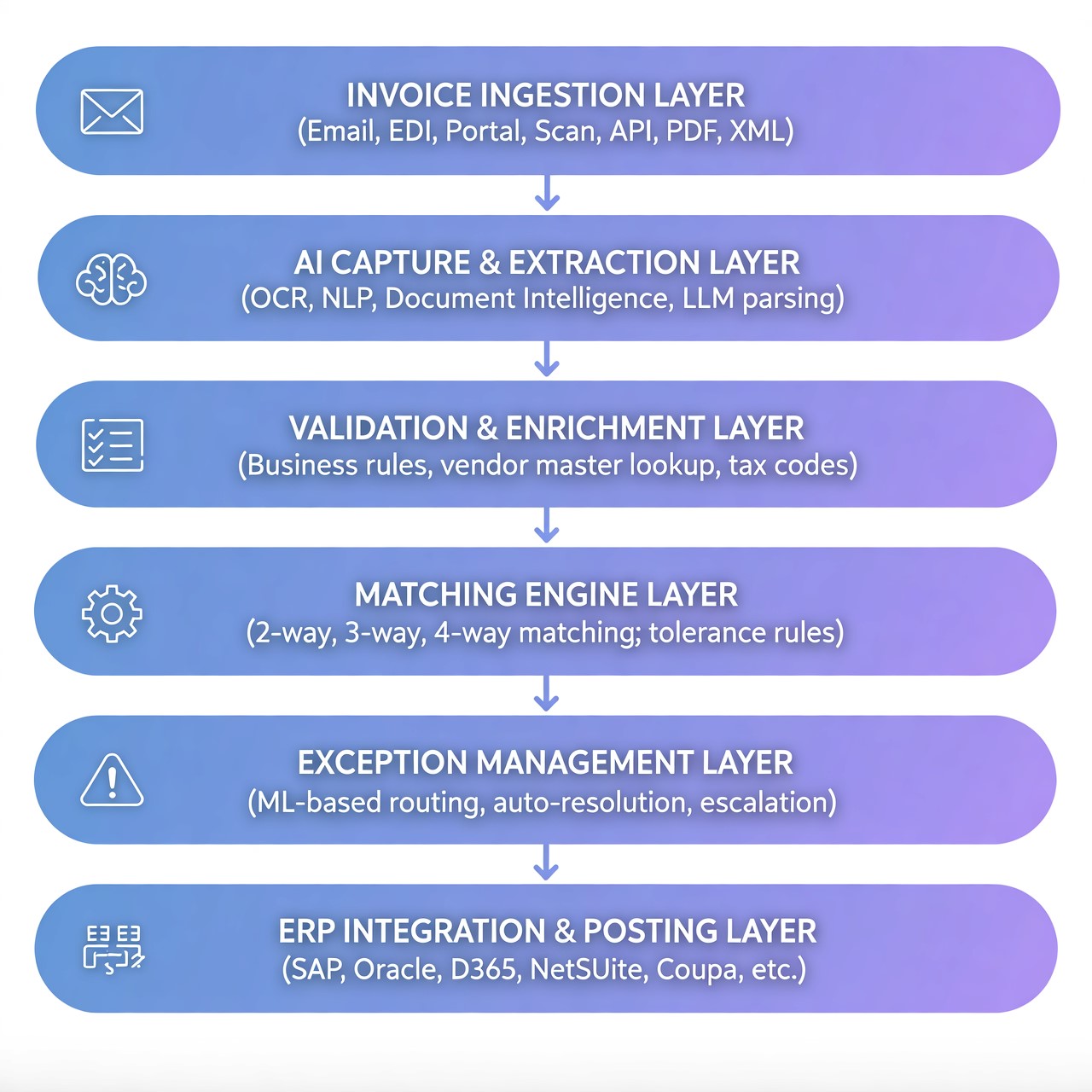
Understanding zero-touch invoice processing requires understanding the layered technical stack that makes it possible. At a high level, a zero-touch AP system consists of six interconnected layers:
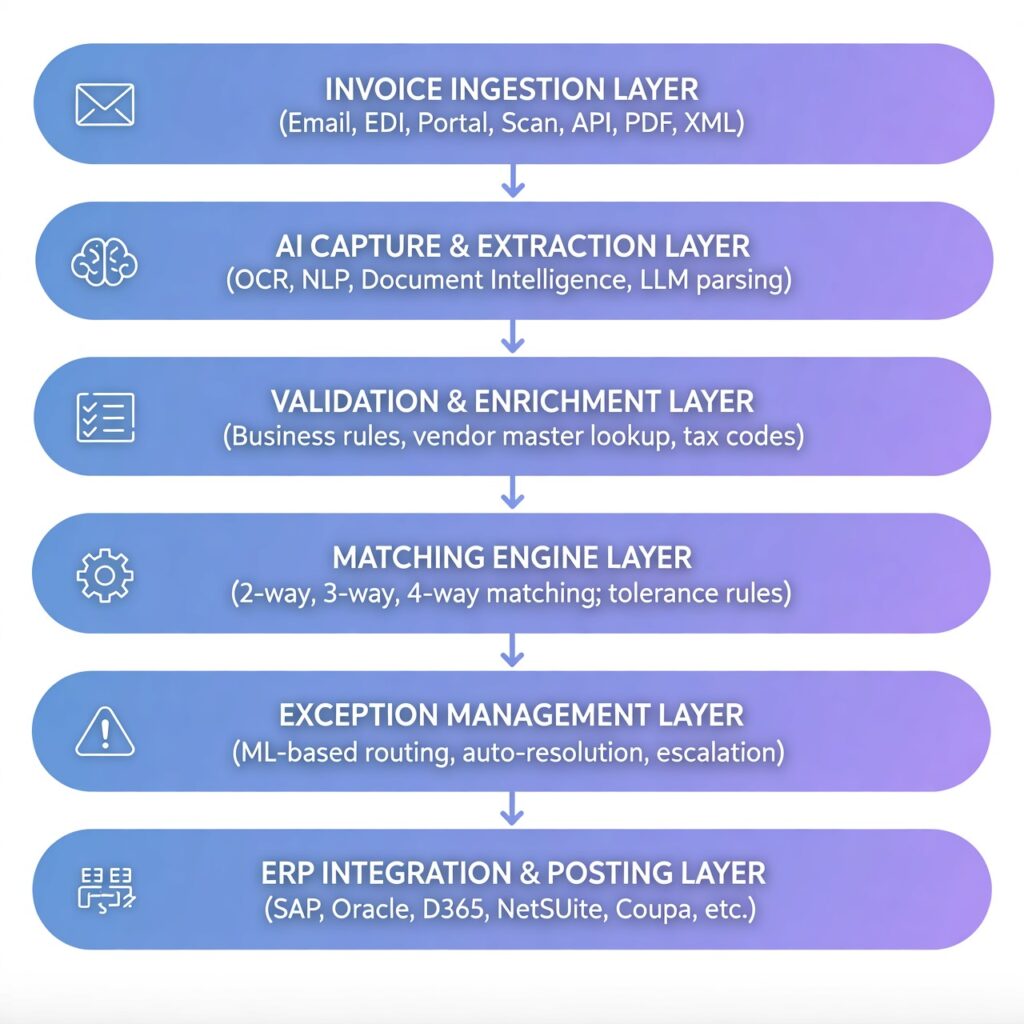
Each layer must function reliably and communicate cleanly with the layers above and below it. A failure at any layer breaks the zero-touch chain and creates a manual touch point.
Core Technology Components
1. Document Intelligence Platforms
Tools like Microsoft Azure Document Intelligence (formerly Form Recognizer), AWS Textract, Google Document AI, or specialist vendors like ABBYY FlexiCapture provide the foundational ability to read and interpret invoice documents.
2. Machine Learning Models
Trained on millions of invoice documents to recognize field positions, vendor-specific layouts, line-item patterns, and contextual data even without a rigid template.
3. Business Process Management (BPM) / Workflow Engines
Platforms like Camunda, Pega, ServiceNow, or native capabilities in ERP suites orchestrate the flow of invoices through validation, matching, and posting steps.
4. ERP Integration Middleware
APIs, enterprise service buses (ESBs), or integration platforms (MuleSoft, Dell Boomi, SAP Integration Suite) connect the AP automation system to the ERP for PO data retrieval, GRN lookup, and posting.
5. Robotic Process Automation (RPA)
Where direct API integration isn’t available, software robots can interact with ERP interfaces to retrieve data or trigger posting, acting as a bridge layer.
6. Analytics and Monitoring
Real-time dashboards tracking zero-touch rate, exception volume, processing time, and cost per invoice, feeding back into continuous improvement loops.
4. AI-Based Invoice Capture: How Machines Read and Interpret Invoices
The first—and most technically complex—challenge in zero-touch processing is getting reliable, structured data out of unstructured invoice documents. This is where AI-based invoice capture operates.
The Limitations of Traditional OCR
Optical Character Recognition (OCR) has existed for decades and can reliably convert image text into machine-readable characters. But standalone OCR is fundamentally insufficient for zero-touch invoice processing for three reasons:
- OCR extracts text; it doesn’t understand context. It might read “100” without knowing whether that’s a quantity, a unit price, a line total, or an invoice number.
- OCR performance degrades on low-quality scans, handwritten annotations, watermarks, colored backgrounds, or complex table structures.
- OCR requires templates or significant post-processing to map extracted text to meaningful fields like “Vendor Name,” “Invoice Date,” or “VAT Amount.”
AI-based capture goes several layers beyond OCR.
Layers of Modern AI Invoice Capture
Layer 1: Document Classification
Before any data extraction occurs, the system must classify what it’s looking at. Is this a vendor invoice? A credit note? A statement? A delivery note? A quotation?
Modern document classifiers use convolutional neural networks (CNNs) or transformer-based models trained to distinguish document types with high accuracy—typically 97–99%+. They look at visual layout, text patterns, presence of specific keywords (“Invoice,” “Bill To,” “Due Date”), and document metadata.
Getting classification right matters because different document types require different extraction logic and different downstream workflows.
Layer 2: Vendor Identification
Knowing which vendor sent the invoice is critical for several downstream steps: looking up vendor master data, applying vendor-specific extraction rules, retrieving open POs, and routing to the right approval chain.
Vendor identification uses multiple signals:
- IBAN/bank account number (high confidence)
- VAT registration number / Tax ID (high confidence)
- Company name fuzzy matching against vendor master (medium confidence, accounts for name variations)
- Email sender address or domain (contextual signal)
- Logo recognition using image classification models (supplementary signal)
When multiple signals align, the system posts a high-confidence vendor match. When signals conflict or are absent, a lower confidence score triggers either enrichment logic or exception routing.
Layer 3: Layout Analysis and Field Detection
This is where modern AI diverges most dramatically from template-based OCR. Rather than being told “the invoice number is always at coordinates X,Y on page 1,” transformer-based document intelligence models learn to understand the semantic structure of a document regardless of layout.
Technologies like Microsoft’s LayoutLM—a transformer model that combines text tokens with their 2D positional coordinates on the page—allow the system to understand that a field labeled “Invoice #” or “Factura No.” or “Rechnungsnummer” followed by an alphanumeric string is an invoice number, even if its position varies across vendors.
Key header fields extracted:
- Invoice number
- Invoice date
- Due date / payment terms
- Vendor name, address, tax ID
- Buyer name and address
- Purchase order reference number(s)
- Currency code
- Subtotal, tax amount, total amount
Layer 4: Line-Item Extraction
Header field extraction is relatively straightforward. Line-item extraction is where most systems fail and where zero-touch rate most often breaks down.
A purchase invoice might contain:
- 1 line item or 500
- Free-form descriptions or standardized part codes
- Multiple UOM (unit of measure) formats
- Quantity and unit price with or without discounts
- Line-level tax rates that vary
- Column headers in different languages or completely absent
- Line items that span page breaks
Advanced AI systems use a combination of:
- Table detection models that identify the bounding box of line-item tables
- Column header recognition using semantic matching (“Qty,” “Quantity,” “Units,” “Menge” all map to the same concept)
- Row segmentation to identify individual line boundaries even in multi-line descriptions
- Mathematical validation at the line level (Qty × Unit Price = Line Total) to catch extraction errors
Layer 5: Confidence Scoring
Every extracted field is assigned a confidence score—typically a probability between 0 and 1 representing the model’s certainty about the extracted value. Scores are derived from the model’s softmax output probabilities for classification tasks, or from ensemble model agreement for extraction tasks.
Confidence thresholds are configurable. A common configuration:
- Score > 0.95: Auto-accept, no human review required
- Score 0.75–0.95: Flag for system-level validation rules before accepting
- Score < 0.75: Route to exception queue for human review
Critically, these thresholds should be calibrated per vendor and per field type. You might accept a 0.80 confidence on a vendor name for a known vendor where the bank account matches, but require 0.95+ on invoice total for a new vendor.
Layer 6: Continuous Learning
The most mature AI invoice capture systems incorporate active learning loops: when human reviewers correct a field extraction, that correction is fed back into the model’s training data. Over time, the system learns vendor-specific layouts, improves on difficult document types, and raises confidence scores across the board.
This is what drives the economics of zero-touch processing: the zero-touch rate typically starts at 40–60% during implementation and climbs to 80–90%+ as the model learns from corrections and vendor data stabilizes.
5. Intelligent Data Extraction: Beyond Basic OCR
Let’s go deeper into specific data extraction challenges that separate basic OCR systems from true AI-powered invoice intelligence.
Multi-Language and Multi-Currency Invoice Processing
Global organizations receive invoices in dozens of languages and currencies. An AI system must:
- Detect document language automatically
- Apply language-specific extraction models or use multilingual transformer models (like multilingual BERT or XLM-RoBERTa)
- Handle locale-specific number formats: “1.234,56” (European) vs. “1,234.56” (US) vs. “1 234.56” (some EU countries)
- Recognize currency symbols and codes: “,””USD,””€,””EUR,””£,””GBP”—andresolveambiguities(multiplecountriesuse””)
- Convert currencies if required using mid-market rates from a financial data API
Handling Unstructured Invoice Descriptions
Line-item descriptions on vendor invoices are notoriously unstructured: “Consulting Services – Q3 2024 per SOW #1234,” “PART NO. AB-12345 x 50 UNITS @ $12.50,” “Professional fees as agreed per contract dated 01/09/24.”
Modern NLP extraction uses:
- Named entity recognition (NER) to identify part numbers, service codes, dates, and references within free-text
- Regex patterns for structured identifiers like PO numbers, part numbers, and reference codes
- Semantic similarity to map vendor-specific descriptions to internal GL accounts or cost centers
- Large language model (LLM) prompting for particularly complex or ambiguous descriptions
Remittance and Tax Line Handling
Invoices in various jurisdictions require specific tax line handling:
- VAT/GST invoices: Multiple tax rates on different line items, rounding rules, reverse charge mechanisms
- US sales tax: State-level rates, product-category exemptions, multi-jurisdiction transactions
- WHT (Withholding Tax): Deducted at source, impacts net payment amount
- Credit notes and adjustments: Negative amounts, applied against specific invoices
AI extraction must correctly parse each of these scenarios and map them to the appropriate tax treatment in the ERP.
6. Invoice Validation and Business Rule Engines
Once data is extracted, it must be validated before matching can occur. Validation operates on two levels: structural validation and business rule validation.
Structural Validation
Structural validation confirms that extracted data is internally consistent and complete:
- Mathematical checks: Do line items sum to the subtotal? Does subtotal + tax = invoice total? (Tolerance: typically ±$0.01 for rounding)
- Date logic: Is the invoice date in the past? Is the due date after the invoice date? Is the date within the current accounting period or a reasonable range?
- Required field completeness: Are all mandatory fields present and non-null? (Vendor ID, invoice number, invoice date, invoice total, currency)
- Format validation: Invoice number format matches expected pattern, bank account passes checksum validation, VAT number format is valid for the country
- Duplicate detection: Does an invoice with the same vendor + invoice number + amount already exist in the system?
Duplicate detection deserves particular attention. It’s one of the highest-value validations in the entire process, as duplicate payments are among the most costly AP errors. Sophisticated duplicate detection uses:
- Exact match on vendor ID + invoice number (catches obvious duplicates)
- Fuzzy match on invoice number (catches typos or reformatting: “INV-2024-001” vs. “INV2024001”)
- Amount + vendor + date proximity matching (catches resubmitted invoices with slightly different numbers)
- Cross-system duplicate checking (especially important during ERP migrations)
Business Rule Validation
Business rules encode organizational policy into automated checkpoints:
| Rule Category | Example |
|---|---|
| Vendor eligibility | Vendor must be active, approved, and not blocked in vendor master |
| Banking details | Invoice bank account must match vendor master (anti-fraud) |
| Currency control | Vendor currency must match PO currency or require FX conversion approval |
| Tax compliance | VAT number on invoice must match vendor master VAT number |
| Spending authority | Invoice amount must not exceed PO value by more than X% |
| Payment terms | Invoice payment terms must match vendor master or PO payment terms |
| Document retention | Invoice must include all required fields for local regulatory compliance |
Business rules are typically managed through a rules engine—a configurable component that allows finance and AP managers to define, test, and modify rules without code changes. Leading platforms use visual rule designers with condition-action logic that non-technical users can maintain.
Vendor Master as the Validation Foundation
A validation layer is only as good as the master data it validates against. Vendor master data quality is the single biggest predictor of zero-touch rate in most implementations.
Common vendor master data problems that destroy zero-touch rates:
- Multiple vendor records for the same supplier (duplicates)
- Outdated banking details
- Missing tax IDs or VAT numbers
- Inconsistent name formatting
- Missing or incorrect payment terms
- No default GL account or cost center mapping
Before implementing zero-touch AP, organizations must invest in vendor master cleansing and establish governance processes to keep it clean. This typically involves:
- Vendor master deduplication analysis
- Verification of banking details against bank-provided validation services
- Tax ID validation via government APIs (VIES for EU VAT, IRS TIN matching for US)
- Establishment of vendor master change management workflows
7. Three-Way and Two-Way Matching Automation
Automated PO matching is the cornerstone of zero-touch invoice processing. It’s the step where the system validates that what a vendor is billing for actually aligns with what was ordered and (in most cases) received.
Understanding Matching Types
Two-Way Matching (Invoice ↔ PO)
The invoice is matched against the purchase order only. Confirms:
- Vendor on invoice matches vendor on PO
- Invoice line items correspond to PO line items
- Unit prices are within tolerance of PO prices
- Quantities don’t exceed PO quantities
- Total amount doesn’t exceed PO value
Used for: Service invoices where there’s no physical receipt, prepayments, recurring invoices
Three-Way Matching (Invoice ↔ PO ↔ GRN)
The invoice is additionally matched against the goods receipt note (GRN) or receiving record. Confirms:
- Goods or services were actually received
- Received quantity matches invoiced quantity
- Received items correspond to invoiced items
Used for: Goods procurement, inventory purchases, capital expenditure
Four-Way Matching (Invoice ↔ PO ↔ GRN ↔ Inspection Record)
Adds a quality inspection confirmation step. Used in pharmaceutical, aerospace, defense, and food manufacturing sectors where regulatory compliance requires documented quality acceptance before payment.
The Mechanics of Automated Three-Way Matching
A fully automated three-way match follows this logic:
textFOR EACH invoice line item: 1. Identify PO reference (from invoice header or line) 2. Retrieve PO line data from ERP 3. Match on: Item code / description / GL account 4. Compare: Invoiced unit price vs. PO unit price → Within price tolerance? (e.g., ±2%) 5. Compare: Invoiced quantity vs. received quantity (GRN) → Within quantity tolerance? (e.g., ±0.5%) 6. Check: PO line still open and not fully invoiced 7. Check: GRN date is before or equal to invoice dateIF all checks pass for all lines: → Auto-approve for postingELSE: → Route to exception handler with specific mismatch detail
Tolerance Management
Zero-tolerance matching would result in near-zero automation rates, because minor discrepancies are inevitable: rounding differences, freight charges added to invoices, currency conversion variations, small over-deliveries.
Tolerance rules define acceptable ranges:
| Match Dimension | Typical Tolerance Range |
|---|---|
| Price per unit | ±1–3% or fixed amount (e.g., ±$0.50) |
| Quantity | ±0–1% |
| Invoice total vs. PO total | ±2–5% or fixed amount |
| Currency amount (FX fluctuation) | ±1–2% |
Tolerances should be:
- Configurable by vendor: Higher tolerances for trusted, long-term suppliers
- Configurable by amount: Tighter tolerances on high-value invoices
- Configurable by category: Different tolerances for goods vs. services
- Auditable: All tolerance-approved invoices logged with specific tolerance applied
Partial Deliveries and Blanket POs
Real-world matching is complicated by:
Partial deliveries: Vendor ships 60 of 100 ordered units and invoices for 60. The match must correctly identify the partial delivery, match to the GRN for 60 units, and leave the PO open for the remaining 40.
Blanket POs / Frame agreements: A single PO for $500,000 of consulting services over 12 months, billed monthly. The match must check each invoice against the cumulative consumed value, not the total PO value.
Multiple GRNs per invoice: Three partial shipments consolidated into one invoice. The match must aggregate GRN quantities correctly.
PO amendments: PO was changed after being raised (price negotiation, quantity reduction). The match must use the current PO version, not the original.
Handling these scenarios correctly requires sophisticated matching logic and deep ERP integration to retrieve real-time PO status, amendment history, and GRN aggregations.
Non-PO Invoice Automation
Not every invoice has a corresponding purchase order—particularly for indirect spend, utilities, subscriptions, and professional services. Zero-touch processing for non-PO invoices relies on:
- Standing orders / recurring invoice rules: Define expected vendor, amount range, frequency, and GL coding in advance
- GL coding automation: Use ML models trained on historical invoice-to-GL mappings to automatically code non-PO invoices
- Cost center allocation: Automatically split invoices across cost centers based on predefined rules or learned patterns
- Delegation of authority automation: Route for approval based on amount, GL account, and cost center owner—but auto-approve when within standing authorization rules
8. Exception Handling Without Human Bottlenecks
In any AP automation system, exceptions are inevitable. The difference between a good system and a great zero-touch system is not the absence of exceptions—it’s how intelligently the system handles them.
Classifying Exceptions
Not all exceptions are equal. A mature exception management framework classifies exceptions by:
Type:
- Matching failures (price, quantity, PO not found)
- Data quality issues (missing fields, low confidence extraction)
- Vendor master mismatches (unknown vendor, blocked vendor)
- Policy violations (over PO value, unauthorized vendor)
- Duplicate suspicions
- Tax/compliance issues
Severity:
- Auto-resolvable: The system can resolve without human input
- Soft exception: Requires review but likely approvable
- Hard exception: Requires investigation or vendor contact
- Compliance exception: Requires escalation to defined authority
Value risk:
- Low-value exceptions (<$500) can often be auto-approved within defined rules
- High-value exceptions require senior authorization
Auto-Resolution Strategies
A key lever for maintaining high zero-touch rates is building auto-resolution logic for common exception types:
| Exception Type | Auto-Resolution Approach |
|---|---|
| Price variance < tolerance | Auto-approve with tolerance flag |
| GRN not yet received (timing) | Hold and recheck after 24–48 hours automatically |
| PO reference missing | Query ML model for PO number based on vendor + amount + date |
| Missing cost center | Apply default cost center from vendor master or GL account mapping |
| Duplicate suspicion (low confidence) | Flag for enriched duplicate check; auto-clear if unique combination confirmed |
| Payment terms mismatch | Apply vendor master payment terms, flag for audit |
| FX rounding difference | Auto-accept within defined FX tolerance |
Intelligent Routing for Human Review
For exceptions that genuinely require human judgment, the routing must be precise, contextual, and fast:
- Route to the right person first time: Based on vendor, cost center, exception type, and amount—not a generic AP queue
- Provide full context in the notification: Show the extracted invoice, the matched PO, the specific mismatch, and suggested resolution options—not just a link to log in to a portal
- Set SLA timers with escalation: If the assigned reviewer hasn’t responded in 24 hours, escalate to their manager automatically
- Enable mobile approval: Simple approve/reject decisions should be actionable from a mobile device without requiring VPN or desktop login
- Learn from resolution patterns: When humans resolve the same exception type repeatedly in the same way, the system should identify this as an auto-resolution candidate
Vendor Query Management
Some exceptions require reaching out to the vendor—a wrong invoice amount, a missing PO reference, an invoiced item not yet ordered. Manual vendor communication is slow, untracked, and inconsistent.
Automated vendor query management:
- Generates structured query emails with specific exception details
- Tracks outstanding queries and sends automatic reminders
- Accepts vendor responses via email parsing or supplier portal
- Updates invoice records automatically when vendor provides corrections
- Maintains audit log of all vendor communications
9. ERP Integration and Automated Posting
The final step in zero-touch processing is posting the validated, matched invoice to the ERP system. This is where many implementations fall short—the automation stops at “approved” and still requires a human to hit “Post” in the ERP.
True zero-touch requires the AP automation system to trigger posting automatically once all conditions are met.
Integration Architecture Patterns
Pattern 1: Native ERP Integration
The AP automation system is either a native module of the ERP (like SAP Invoice Management, Oracle Payables) or has certified connectors to major ERPs. Data flows via standard APIs (OData, REST, SOAP) with real-time or near-real-time synchronization.
Pros: Reliable, well-tested, supported by ERP vendor
Cons: Less flexible, may limit choice of AP automation platform
Pattern 2: Middleware Integration
An iPaaS (Integration Platform as a Service) layer like MuleSoft, Dell Boomi, or Azure Logic Apps orchestrates data flow between the AP automation system and ERP. The middleware handles data transformation, error handling, and retry logic.
Pros: Flexible, supports multiple ERPs, decouples systems
Cons: Additional complexity and cost
Pattern 3: RPA-Based Integration
Where APIs aren’t available (legacy ERP systems, certain SAP configurations), RPA bots replicate the keystrokes a human would use to enter invoice data into the ERP UI.
Pros: Works with any system the human can use
Cons: Brittle (breaks when UI changes), slower, not recommended as primary architecture
What Gets Posted to the ERP
A fully automated posting event pushes:
textINVOICE HEADER:- Vendor ID (mapped to vendor master)- Invoice number (unique identifier)- Invoice date- Posting date (accounting date)- Due date / payment terms- Currency and exchange rate- Total amount- Payment method- Document type codeINVOICE LINE ITEMS (per line):- GL account code- Cost center / profit center- WBS element (project accounting)- Asset number (for capital invoices)- Tax code / VAT code- Amount (net)- Tax amount- PO reference (number + line)- GRN reference- Internal orderPAYMENT INFORMATION:- Vendor bank account (selected from approved accounts)- Payment block (if applicable)- Cash discount terms
Handling Posting Failures
Automated posting introduces a new category of exception: the ERP rejects the posting due to a system-level error. Common causes:
- GL account closed or inactive
- Cost center locked (period closed)
- Duplicate invoice number at ERP level
- FX rate not loaded for the posting date
- Vendor payment block active
The zero-touch system must capture the ERP rejection message, classify it, and either:
- Auto-resolve (e.g., calculate FX rate from an API and retry)
- Route to specific resolver (e.g., period-closed cost center goes to cost center owner)
- Notify with specific action required (not a generic “posting failed” alert)
Automated Payment Scheduling
Post-posting, true zero-touch extends into payment scheduling. The system:
- Calculates optimal payment date using payment terms and cash discount windows
- Groups invoices by vendor and payment method for payment run efficiency
- Checks vendor payment block status
- Queues payment for the next appropriate payment run
- (Where bank connectivity exists) initiates payment directly via SWIFT or open banking APIs
10. Vendor Master Data Management and Its Role in Zero-Touch
We touched on vendor master data quality earlier, but it deserves dedicated attention because no amount of AI sophistication can compensate for poor vendor master data.
The Vendor Master as the Zero-Touch Enabler
Every step of zero-touch processing depends on vendor master data:
| Process Step | Vendor Master Dependency |
|---|---|
| Vendor identification | Name, tax ID, bank account |
| Validation | VAT number, payment terms, currency |
| Matching | Default GL accounts, PO matching rules |
| Exception routing | Vendor relationship owner, SLA tier |
| Posting | ERP vendor code, payment method |
| Payment | Bank account details, payment terms |
Vendor Onboarding as the Foundation
Zero-touch rate for a vendor can only be as high as the completeness of that vendor’s master record. A structured vendor onboarding process should capture:
- Legal entity name (exact) and trading names
- Registration numbers (company registration, VAT/GST, tax ID)
- Registered address and correspondence address
- Bank account details with verification
- Payment terms (standard and early payment)
- Currency
- Preferred invoicing method
- Expected invoice format and template (if available)
- GL account defaults
- Cost center defaults
- Contact details for AP queries
- Self-billing arrangement (if applicable)
Maintaining Vendor Master Quality
Ongoing vendor master hygiene:
- Annual vendor review process: Confirm details still accurate, deactivate dormant vendors
- Change management workflow: All changes to banking details require dual authorization and original document verification
- Automated enrichment: Third-party data services (Dun & Bradstreet, Creditsafe) can auto-populate and validate vendor data
- Bank account verification: Services like SWIFT gpi or country-specific bank verification APIs confirm account validity before payment
11. Measuring Zero-Touch Rates: KPIs and Benchmarks
Implementing zero-touch AP without robust measurement is like driving without a speedometer. You need precise metrics to understand current performance, identify bottlenecks, and demonstrate ROI.
Primary KPI: Zero-Touch Rate
Definition: Percentage of total invoices processed from receipt to ERP posting without any manual intervention.
Formula:
textZero-Touch Rate = (Invoices posted without manual touch / Total invoices received) × 100
Industry Benchmarks:
| AP Maturity Level | Zero-Touch Rate |
|---|---|
| Manual / Spreadsheet-based | 0–5% |
| Basic OCR + Email workflow | 15–30% |
| AP Automation Platform | 40–65% |
| AI-Powered Zero-Touch System (Year 1) | 60–75% |
| AI-Powered Zero-Touch System (Year 2+) | 80–92% |
| Best-in-class (EDI/e-invoice heavy) | 92–98% |
Supporting KPIs
| KPI | Definition | Target |
|---|---|---|
| Straight-Through Processing Rate | Invoices that complete all automated steps without exception | >80% |
| Exception Rate | % of invoices generating at least one exception | <20% |
| Auto-Resolution Rate | % of exceptions resolved automatically | >60% |
| Average Processing Time | Receipt to ERP posting (hours) | <4 hours |
| Cost Per Invoice | Total AP operating cost / total invoices | <$2.00 |
| Duplicate Invoice Rate | % of invoices identified as duplicates | <0.5% |
| First-Time Match Rate | % of invoices matched on first attempt | >85% |
| On-Time Payment Rate | % of invoices paid within agreed terms | >98% |
| Early Payment Capture Rate | % of available early payment discounts captured | >90% |
Exception Analysis by Category
Track exceptions by root cause to prioritize improvement:
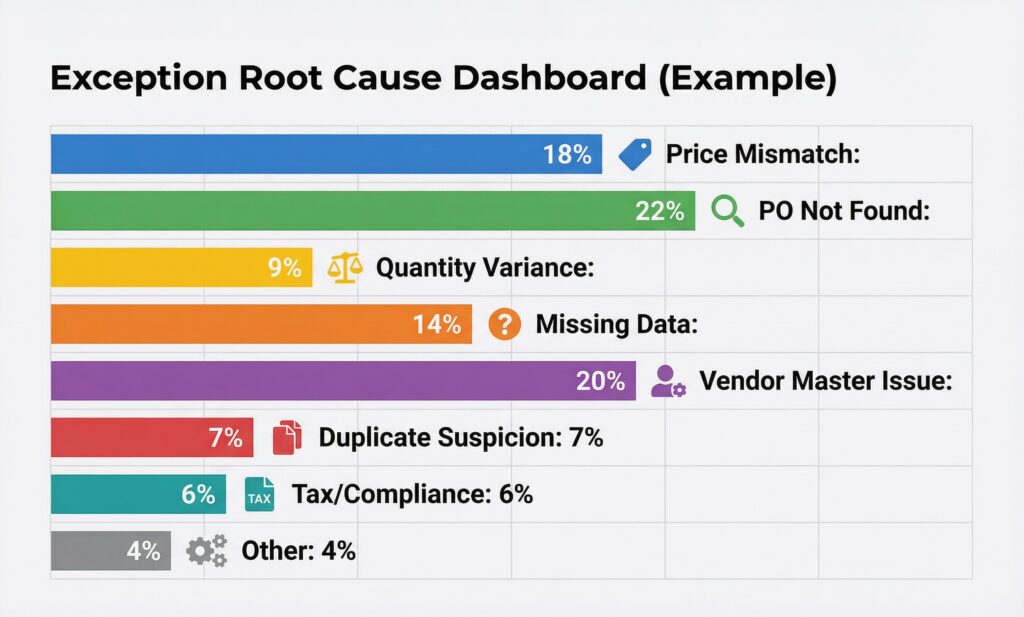
The top exception categories directly indicate where to focus remediation: PO not found points to procurement process issues; vendor master issues point to onboarding gaps; price mismatch points to PO management or supplier compliance problems.
12. Implementation Roadmap: From Manual to Zero-Touch
Implementing zero-touch AP is a transformation program, not a software installation. A realistic roadmap typically spans 12–18 months for a mid-market organization and 18–36 months for a global enterprise.
Phase 1: Foundation (Months 1–3)
Objectives: Clean the data, understand the current state, select the platform
Activities:
- AP process audit: Document current invoice types, volumes, vendors, exceptions, and cycle times
- Vendor master cleansing: Deduplicate, enrich, and validate all active vendors
- Invoice analysis: Sample 500–1,000 invoices to understand format distribution (email PDF, scan, EDI, portal), vendor concentration (top 20% of vendors typically = 80% of volume)
- Technology evaluation: RFP/RFI for AP automation platforms; shortlist based on AI capability, ERP integration, scalability
- Business case development: Quantify cost savings, FTE reduction/redeployment, error reduction, discount capture potential
Key deliverables: As-is process map, vendor master quality scorecard, technology selection, approved business case
Phase 2: Core Implementation (Months 3–8)
Objectives: Deploy the platform, train the AI, integrate with ERP
Activities:
- Platform configuration: Set up ingestion channels (email, portal, EDI)
- AI model training: Feed historical invoice samples (minimum 1,000 per major vendor format) to train extraction models
- Business rules configuration: Define validation rules, tolerance settings, matching logic
- ERP integration build: Develop and test bidirectional integration for PO retrieval, GRN lookup, and invoice posting
- Parallel running: Process invoices through both old and new systems simultaneously; compare outputs
- Exception workflow design: Map all exception types to routing rules and resolution workflows
Key deliverables: Configured platform, trained AI models, tested ERP integration, exception workflow documentation
Phase 3: Go-Live and Stabilization (Months 8–12)
Objectives: Transition live invoices, optimize zero-touch rate
Activities:
- Phased vendor rollout: Start with top 20 vendors (highest volume, cleanest data) to maximize early zero-touch rate
- Monitor and tune: Daily review of exceptions, AI confidence scores, and zero-touch rate
- Vendor communication: Notify vendors of new submission preferences (email to specific address, portal link, EDI setup)
- AP team retraining: Shift team focus from data entry to exception resolution and vendor management
- Active learning: Ensure human corrections feed back into AI model retraining cycles
Key deliverables: Live system processing all invoices, exception resolution playbooks, weekly performance dashboards
Phase 4: Optimization (Months 12–18+)
Objectives: Drive zero-touch rate above 80%, extend to advanced capabilities
Activities:
- E-invoicing vendor enablement: Convert top vendors to structured e-invoice formats (EDI 810, PEPPOL, UBL XML) which achieve near-100% zero-touch
- AI model refinement: Continuous learning driving confidence score improvements
- Non-PO invoice automation: Implement GL coding ML models for indirect spend
- Analytics expansion: Spend analytics, supplier performance, payment optimization
- Advanced matching: Expand to four-way matching for applicable categories
- Payment automation: Connect to bank APIs for automated payment execution
13. Security, Compliance, and Audit Considerations
Zero-touch AP operates with significant financial authority. Robust security and compliance controls are non-negotiable.
Fraud Prevention
The biggest security risk in automated AP is invoice fraud: fraudsters submitting fake invoices or manipulating legitimate ones to redirect payments.
Critical controls:
- Bank account change controls: Any change to vendor banking details requires multi-factor verification and dual authorization; automated posting is blocked until manually approved
- New vendor controls: First invoice from an unrecognized vendor always routes to human review regardless of AI confidence
- Amount anomaly detection: ML models that flag invoices significantly outside the vendor’s historical amount range
- IBAN/BIC verification: Bank account validity checked via API before any payment is processed
- Segregation of duties: The system that approves invoices must be separate from the system that initiates payment
Audit Trail Requirements
Every automated decision must be fully auditable:
- Complete event log: Every step from receipt to posting with timestamp, system action, and data state
- Confidence score logging: AI confidence scores logged at field level for every extraction
- Rule application logging: Which specific rules were applied, with what inputs and outputs
- Exception log: Every exception generated, how it was resolved (auto or manual), by whom, when
- Tolerance log: Every invoice approved under a tolerance rule, with the specific tolerance applied
- Model version tracking: Which version of the AI model processed which invoice (important for model governance)
This audit trail must be immutable, tamper-evident, and retained according to local statutory requirements (typically 7–10 years).
Regulatory Compliance
AP automation must accommodate jurisdiction-specific regulatory requirements:
| Regulation | Requirement | AP System Implication |
|---|---|---|
| EU VAT Directive | Electronic invoices must be authentic, integral, legible | Digital signature validation, integrity checking |
| GDPR / UK GDPR | Personal data in invoice processed lawfully | Data minimization, retention limits, subject access |
| Sarbanes-Oxley (SOX) | Financial controls documented and tested | Documented automation controls, testing evidence |
| DORA (EU Financial) | Operational resilience for financial entities | Disaster recovery, failover, vendor risk for AP platform |
| Local e-invoicing mandates | Country-specific e-invoice requirements (Italy, France, Saudi, etc.) | Compliant e-invoice ingestion and archiving |
Data Residency and Privacy
Invoice documents may contain personal data (individual names, contact details). Ensure:
- AP automation platform data residency meets local requirements
- Invoice data is encrypted at rest and in transit
- Access controls are role-based and audited
- Retention policies are automated (auto-deletion after statutory period)
14. Common Pitfalls and How to Avoid Them
Learning from others’ mistakes accelerates your path to high zero-touch rates.
Pitfall 1: Treating It as a Pure Technology Project
What goes wrong: Finance and IT implement the technology without process redesign, user adoption, or change management. The system runs but the team doesn’t trust it, overrides automated decisions, and the zero-touch rate stagnates at 40%.
Avoid by: Running a formal change management program. Involve AP team members in the design process. Communicate clearly what changes for their roles (less data entry, more analysis and exception resolution). Celebrate zero-touch rate milestones.
Pitfall 2: Insufficient Training Data
What goes wrong: The AI model is trained on a small or non-representative sample of invoices. Performance is good during testing but degrades on live invoices from less common vendors or in unusual formats.
Avoid by: Training on a minimum of 500 samples per vendor format cluster, including edge cases. Include invoices that previously caused problems. Plan for ongoing training as new vendor formats are encountered.
Pitfall 3: Skipping Vendor Master Remediation
What goes wrong: Platform is implemented on top of messy vendor master data. 30% of invoices fail vendor identification because vendor names don’t match, tax IDs are missing, or there are duplicate vendor records.
Avoid by: Making vendor master remediation Phase 1, not an afterthought. Measure and report vendor master completeness as a project KPI. Set a minimum quality bar before going live.
Pitfall 4: Over-Tightening Tolerances
What goes wrong: To be “safe,” the team sets very tight matching tolerances. Exception rate is 60%. The AP team spends more time resolving exceptions than they did processing invoices manually.
Avoid by: Analyze historical invoice data to understand actual price and quantity variance distributions. Set initial tolerances that clear 90% of legitimate variances. Tighten selectively based on vendor risk, not uniformly.
Pitfall 5: Inadequate ERP Integration
What goes wrong: The AP automation system and ERP are connected via a fragile custom integration or RPA bot. Posting failures are frequent. The AP team loses confidence and starts manually posting everything.
Avoid by: Investing properly in integration architecture. Use certified connectors or well-tested middleware. Implement comprehensive error handling with clear failure messages. Test the integration with volume load testing before go-live.
Pitfall 6: Ignoring E-Invoicing Enablement
What goes wrong: All effort goes into AI-based capture for PDF invoices. E-invoicing via EDI or PEPPOL—which could achieve near-100% zero-touch for enabled vendors—is treated as a future phase that never happens.
Avoid by: Prioritizing e-invoicing enablement for top-volume vendors alongside AI capture implementation. Even 20 vendors on EDI can represent 40–50% of invoice volume with near-zero extraction effort.
Pitfall 7: No Exception Analytics
What goes wrong: Exceptions are resolved individually but nobody analyzes patterns. The same exception types recur month after month without root cause resolution.
Avoid by: Build exception dashboards from day one. Review weekly. Assign improvement owners to top exception categories. Track whether exception rates by category are declining.
15. The Future of Zero-Touch Invoice Processing
The current generation of zero-touch AP is impressive, but the technology is still evolving rapidly. Here’s where the space is heading.
Generative AI and LLMs in AP
Large language models (GPT-4, Claude, Gemini, and their successors) are entering AP automation in multiple ways:
- Complex invoice interpretation: LLMs can understand ambiguous contract references, interpret complex service descriptions, and resolve contextual ambiguities that traditional ML models struggle with
- Automated vendor query drafting: When an exception requires contacting a vendor, an LLM can draft a precise, contextually appropriate query email automatically
- Conversational exception resolution: AP managers can interact with the system in natural language: “Why did invoice INV-2024-1234 from Acme Supplies fail matching?” and receive a clear, specific explanation
- Policy interpretation: LLMs trained on organizational AP policy documents can interpret edge cases and provide recommendations consistent with policy
Continuous Control Monitoring
Future AP systems will shift from periodic audit to continuous control monitoring: real-time analysis of every transaction against fraud indicators, compliance requirements, and policy rules, with automatic escalation of concerns before payment is made.
Predictive Cash Flow Integration
Zero-touch AP generates rich real-time data about upcoming payment obligations. Next-generation systems will feed this directly into treasury systems for predictive cash flow modeling, enabling finance teams to optimize payment timing, early payment decisions, and working capital management dynamically.
Supplier Network Intelligence
Rather than each company maintaining its own vendor master and training its own AI models in isolation, emerging supplier networks (like SAP Business Network, Tradeshift, Coupa Pay) create shared intelligence: invoice validation against supplier-confirmed data, shared fraud signals, and pre-verified e-invoice delivery.
Real-Time E-Invoicing Mandates
By 2028–2030, real-time e-invoicing will be mandatory in much of the EU, Latin America, Southeast Asia, and the Middle East. In these regimes, invoices are submitted to a government tax authority platform and validated before they’re even delivered to the buyer. This effectively pre-validates invoice legitimacy and dramatically simplifies buyer-side processing—driving zero-touch rates toward 99%+ for domestic transactions.
Autonomous AP Agents
The convergence of LLMs with agentic AI frameworks is enabling truly autonomous AP agents that can:
- Identify missing POs and contact the requester to raise one retroactively
- Negotiate minor invoice disputes with vendor systems autonomously
- Initiate vendor onboarding when an invoice arrives from an unknown supplier
- Recommend changes to PO pricing based on invoice variance patterns over time
16. Conclusion
Zero-touch vendor invoice processing represents one of the highest-ROI transformations available to finance organizations today. By combining AI-based invoice capture with intelligent automation workflows, organizations can process the vast majority of purchase invoices from receipt to ERP posting without any human intervention—reducing costs by 70–85%, cutting cycle times from days to hours, eliminating data entry errors, and freeing AP professionals to focus on work that genuinely requires human judgment.
The path to zero-touch is not instant—it requires investment in technology selection, vendor master quality, AI model training, ERP integration, and change management. But the trajectory is clear: organizations that invest in zero-touch AP today will process invoices at a fraction of the cost of their competitors, capture cash discounts that others miss, pay suppliers on time every time, and have real-time visibility into their payables position.
The technology has matured to the point where high zero-touch rates—80–90%+ for routine invoices—are achievable within 12–18 months for most organizations. And with e-invoicing mandates driving structural change globally, the remaining manual processes will be automated by regulatory necessity within the decade.
The question for finance leaders is no longer whether to pursue zero-touch invoice processing—it’s how quickly you can get there.
Key Takeaways
✅ Zero-touch AP processes invoices from receipt to ERP posting without manual intervention for routine transactions
✅ AI-based capture goes far beyond OCR, using transformer models, confidence scoring, and active learning to achieve high extraction accuracy across diverse invoice formats
✅ Three-way matching automation is the core of zero-touch, but requires deep ERP integration, well-configured tolerances, and clean vendor master data
✅ Exception management must be intelligent—auto-resolving common exceptions and routing genuine ones precisely to minimize human effort
✅ Vendor master quality is the most underestimated prerequisite—invest in cleansing before implementation
✅ Zero-touch rate grows over time as AI models learn and e-invoicing enablement expands
✅ Security and compliance are non-negotiable—full audit trails, bank account controls, and fraud detection must be built in from day one
✅ Measure relentlessly—zero-touch rate, exception rate, cost per invoice, and processing time are your core operational KPIs
Ready to assess your organization’s zero-touch AP readiness? Start with an invoice process audit and vendor master quality assessment—these two activities will define your realistic zero-touch potential and give you the data to build a compelling business case.